
Tablet Styluses used and refurbished
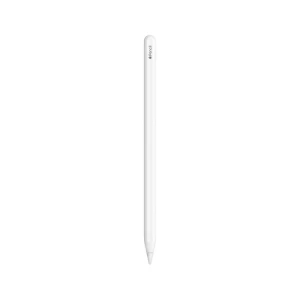
A stylus doesn't wear evenly. The plastic tip gets worn down by friction against the glass and can feel rough after a few months of daily note-taking, but it screws on, so you can replace it in a minute. The rest has no moving parts. The battery loses a bit of capacity over time, but the 2nd-generation Apple Pencil tops up every time it's attached to the side of the iPad.
At SWOPiFY you'll find used and refurbished tablet styluses – currently the white 2nd-generation Apple Pencil (model A2051). Before a unit goes back on sale, SWOPiFY partners check it, and if anything needs fixing, the stylus goes to repair first.
Which tablet styluses can you find at SWOPiFY?
The range is grouped in the "Apple Pencil stylus" subcategory. The 2nd-generation Apple Pencil debuted in 2018 alongside the 3rd-generation iPad Pro. It has one flat side that attaches magnetically to the tablet and no port at all – it pairs and charges only via the iPad's magnetic connector. It senses pressure and tilt, so a line drawn with more pressure comes out darker.
A double tap on the body switches to the last tool you used in supported apps such as Notes – usually from pen to eraser. With an iPad Pro with the M2 chip, hover also works: the screen shows where the line will go before the tip touches the glass. It's handy for students, illustrators and signing documents.
Why consider a refurbished stylus?
A refurbished Apple Pencil costs less than a new one, and a checked unit writes just the same. A stylus has no screen or keyboard that could wear out. If it pairs, charges and registers pressure, the difference comes down to the look of the body and the state of the tip, which you'll replace yourself anyway.
When someone moves to a newer iPad, a working 2nd-generation stylus often ends up without a partner and lands in a drawer. Passed on, it serves someone with an iPad Air 4 or iPad mini 6 instead of becoming e-waste.
What should you check before buying?
Compatibility, above all. The Apple Pencil family has four models – 1st generation, 2nd generation, USB-C and Pro – and each supports different iPads. The 2nd-generation Apple Pencil works only with the 6th-generation iPad mini, the 4th- and 5th-generation iPad Air, the 11-inch iPad Pro from the 1st to the 4th generation, and the 12.9-inch iPad Pro from the 3rd to the 6th generation.
It won't connect to an iPad Air with the M2 chip or later, an iPad Pro with the M4 chip or later, an iPad mini with the A17 Pro chip or later, the 10th-generation iPad or the iPad (A16). Those use the Apple Pencil Pro or Apple Pencil (USB-C), while older iPads with a Home button support the 1st-generation Apple Pencil. You can check your tablet model in Settings: General > About.
You can filter tablet styluses at SWOPiFY by:
- subcategory – Apple Pencil stylus;
- condition, including the quick filter "Condition: Excellent";
- price – lowest or highest first;
- popularity;
- date added – newest first;
- name – alphabetically from A to Z or from Z to A.
Once it arrives, turn on Bluetooth, attach the stylus to the connector on the side of the iPad and confirm pairing. If the prompt doesn't appear, take off the case and leave the stylus attached for a minute so it can charge. The Batteries widget will show the battery level.
How does the technical check work?
Before a stylus goes on sale as refurbished, it goes through a technical check, including:
- Bluetooth pairing with a compatible iPad;
- charging when attached to the magnetic connector;
- the battery – whether the stylus holds a charge;
- response to pressure and tilt when drawing;
- the double-tap function;
- the tip – wear, cracks and how firmly it's screwed in;
- the body, including the flat magnetic side.
Can you trust refurbished styluses?
Refurbished tablet styluses at SWOPiFY are used hardware – tested and, in case of a fault, repaired by partners that SWOPiFY chooses after a multi-stage vetting process. We don't pretend it's a new product straight from the factory.
Your purchase comes with a warranty. The stylus's condition is described on a scale: Premium, Excellent, Good or Fair – from no signs of use to marks visible to the naked eye. Small scratches on the body don't change how the stylus writes, so a lower grade is fine for notes in class. For a gift, Premium or Excellent is the better choice.
Got an old tablet you no longer use?
SWOPiFY doesn't buy back styluses, but it does buy tablets, as well as smartphones and smartwatches. You choose the brand and model, rate the condition and see the quote straight away, and shipping is free. The amount you get will lower the cost of your next iPad or stylus.
Before sending it, sign out of your Apple Account, turn off "Find My" and restore factory settings. Browse the available tablet styluses and check which one fits your iPad.